
Within the AlayaCare Dashboard there are 3 KPIs (Key Performance Indicators) that can be used to manage and review caregiver check ins.
1. Scheduled Visit KPI: Represents: any ongoing Visits, i.e. Start Time is before current time and End Time is after.
2. Late Visit KPI: The Late Visits KPI will turn red if any Visits are currently late based on the configuration settings determined by your agency.
The number displayed on the KPI is the current number of Late Visits. Click on the Late Visits KPI to access a list of Late and Missed Visits.
Visits that are currently late will display how late the Visit is based on the scheduled Start Time (in hh:mm).
Use the filtering options to sort Visits by number of hours late, date, Group(s), or Service Code.
3. Attendance Dashboard/Clocked-In Via Mobile KPI:
From the Attendance Dashboard page, you can track the status of the day's Visits.
The names of Employees assigned to Visits for the day will appear on the left with their corresponding Visits. If an Employee has not been assigned to the Visit, [Vacant Visit] will appear instead of an Employee name.
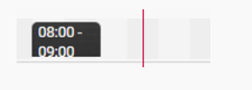
The black blocks represent the scheduled duration of each Visit.
Click on a block to open the Visit dialogue and see more details about the Visit.
The red line marks the current time in the day.
Colored bars represent the status of Visits. A blue bar indicates a Completed Visit (visit from 0600-14:00 in the screenshot below is a completed visit with Clock In and Clock Out).
As shown in the below screenshot, green bar indicates an Open Visit. This means that the care worker is currently clocked in at the Visit (06:00-21:59).
If the Visit should have already started and no green bar appears, the worker is late.
If a Visit has already passed and no green or blue bar appears, the Visit has been missed.
Comments
0 comments
Please sign in to leave a comment.